Overview
Paga allows you to customize the look and feel of it's pages, for display on your app. This section requires some knowledge of CSS.
Please see the following articles for an introduction to CSS
Default Paga Screenshots
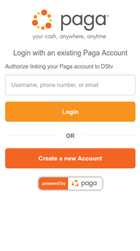
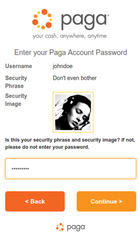
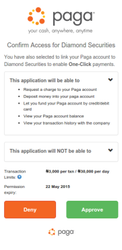
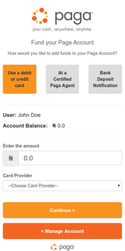
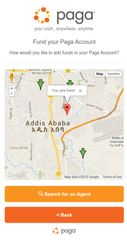
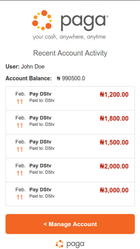
You can change background colors, button colors and states, as well as include a custom logo etc. See the examples below
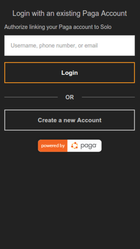
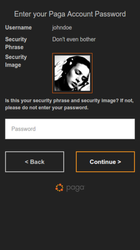
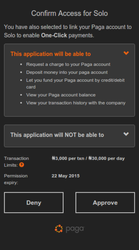
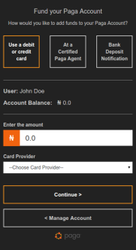
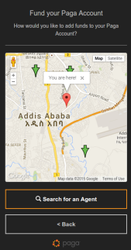
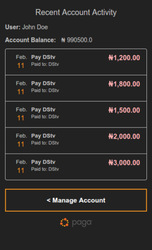
The full list of customizations are listed below.
| Tip | ||
|---|---|---|
| ||
Open the default Paga views, in the Google chrome browser, Open up the Chrome developer tools, and edit the styles there for a live preview of your changes. See the Editing Styles and the DOM article for more information. |
Create CSS File
Create a css file with your client_id + "-style.css" as the file name.
Styles can be display name specific. in that case the file naming convention is client_id + display_name + "-style.css"
| Code Block | ||
|---|---|---|
| ||
Default: xxxxxxx-xxxxxxx-xxxxxxx-style.css Display Names: xxxxxxx-xxxxxxx-xxxxxxx-display_name-style.css |
Logo
To have your custom logo displayed at the top of the pages, send a url that points to your logo to the Paga Operations Support team and requesting the change.
| Note | ||
|---|---|---|
| ||
Ensure that your image size is appropriate for your main platform. For mobile applications, smaller images are preferable. |
Hide Logo
You can also choose to remove your logo completely. This is useful in mobile applications to save on screen space, or in cases when the web pages are being loaded in a Web view, and the app already has a logo.
To hide the logo include the following in your css file.
| Code Block | ||||
|---|---|---|---|---|
| ||||
.client-logo {
	display: none;
} |
| Tip |
|---|
Bootstrap 3 provides the base classes for customization, all valid bootstrap 3 tags can be safely overridden if they apply. |
Body & Headings
| Code Block | ||||
|---|---|---|---|---|
| ||||
body {
	background-color: #xxxxxx;
}

h1, h2, h3, h4, h5, h6, p, i, ul {
	color: #xxxxxx;
} |
Links
| Code Block | ||||
|---|---|---|---|---|
| ||||
a {
	color: #F1630F#xxxxxx;
}
a:hover, a:focus {
	color: #F1630F#xxxxxx;
} |
Form Inputs
| Code Block | ||||
|---|---|---|---|---|
| ||||
.input-group-lg>.form-control, .input-group-lg>.input-group-addon,
	.input-group-lg>.input-group-btn>.btn {
	border-radius: 0;
	border: none;
}

.input-group-addon {
	background: #F1630F#xxxxxx;
	color: #fff#xxxxxx;
}

input {
	border-radius: 0;
	color: #404040#xxxxxx;
}

input[type=text], input[type=password], input[type=email], input[type=tel]
	{
	padding: 15px;
	margin-bottom: 16px;
	height: auto;
	border-radius: 0;
}

input.form-control {
	color: #404040#xxxxxx;
}

select.form-control {
	border-radius: 0;
}

.form-control:focus {
	border-color: #E9B166#xxxxxx;
	-webkit-box-shadow: inset 0 1px 1px rgba(0, 0, 0, .075), 0 0 8px
		rgba(233, 137, 102, .6);
	box-shadow: inset 0 1px 1px rgba(0, 0, 0, .075), 0 0 8px
		rgba(233, 137, 102, .6);
} |
Text
| Code Block | ||||
|---|---|---|---|---|
| ||||
.text-gray {
	color: #C5C5C5#xxxxxx;
}
.text-danger {
	color: #F7931E#xxxxxx;
}

label {
	color: #C5C5C5#xxxxxx;
} |
Buttons
| Code Block | ||||
|---|---|---|---|---|
| ||||
.btn {
	border-radius: 0;
	background: transparent;
	border: 2px solid #c5c5c5#xxxxxx;
	color: #c5c5c5#xxxxxx;
}

.btn:hover, .btn:focus {
	color: #fff#xxxxxx;
}

.btn-primary, #selected-btn {
	border-color: #F7931E#xxxxxx;
	color: #fff#xxxxxx;
	background: transparent;
}

.btn-primary:hover, .btn-primary:focus, .btn-primary:active,
	.btn-primary.active, .open .dropdown-toggle.btn-primary {
	background: transparent;
}

.btn-secondary:active, .btn-secondary:hover {
	background: transparent;
}

.btn-primary.disabled, .btn-primary[disabled], fieldset[disabled] .btn-primary,
	.btn-primary.disabled:hover, .btn-primary[disabled]:hover, fieldset[disabled] .btn-primary:hover,
	.btn-primary.disabled:focus, .btn-primary[disabled]:focus, fieldset[disabled] .btn-primary:focus,
	.btn-primary.disabled:active, .btn-primary[disabled]:active, fieldset[disabled] .btn-primary:active,
	.btn-primary.disabled.active, .btn-primary[disabled].active, fieldset[disabled] .btn-primary.active
	{
	background: transparent;
	color: #999#xxxxxx;
	opacity: 0.3;
}

.button-subtext {
	color: #bbb#xxxxxx;
} |
Lists
| Code Block | ||||
|---|---|---|---|---|
| ||||
.list-group {
	color: #C5C5C5#xxxxxx;
}

.list-group-item {
	background: transparent;
	border-color: #c5c5c5#xxxxxx;
}


ul.mobile-menu li a, ul.mobile-menu li:last-child a {
	border-color: #949494#xxxxxx;
}

ul.mobile-menu li:first-child a {
	border-top-left-radius: 5px;
	border-top-right-radius: 5px;
}

ul.mobile-menu li:last-child a {
	border-bottom-left-radius: 5px;
	border-bottom-right-radius: 5px;
}

ul.mobile-menu li a:hover, ul.mobile-menu li a:active {
	background: rgba(255, 255, 255, 0.3);
	color: #fff#xxxxxx;
} |
Alerts
| Code Block | ||||
|---|---|---|---|---|
| ||||
.alert-warning, .alert-danger {
	background-color: transparent;
	border-radius: 0;
	border-color: #F7931E#xxxxxx;
} |
Transaction Styles
Custom styles for the transaction history page.
| Code Block | ||||
|---|---|---|---|---|
| ||||
.recent-transaction .date .day {
	color: #F7931E#xxxxxx;
}
.recent-transaction .action .debit {
	color: #FDAEAE#xxxxxx;
}
.recent-transaction .action .credit {
	color: #A5D883#xxxxxx;
} |
Miscellaneous
| Code Block | ||||
|---|---|---|---|---|
| ||||
span.divider-text {
	color: #C5C5C5#xxxxxx;
	background-color: #222#xxxxxx;
}

.security-image {
	border-color: #F1630F#xxxxxx;
}

#agentmap {
	height: 25em;
}

.security-image-register {
	border-color: #F1630F#xxxxxx;
}

.panel-default {
	border-color: #6B6B6B#xxxxxx;
}

.panel {
	background: rgba(255, 255, 255, 0.1);
}

hr {
	border-top-color: #888#xxxxxx;
}

.primary-color {
	color: #F7931E#xxxxxx;
}

div.modal-content {
	background-color: #3A3A3A#xxxxxx;
	border: 2px solid #999#xxxxxx;
	font-size: 13px;
} |
| Table of Contents |
|---|
Related articles
| Filter by label (Content by label) | ||||||||||||||||
|---|---|---|---|---|---|---|---|---|---|---|---|---|---|---|---|---|
|
| Page Properties | ||
|---|---|---|
| ||
|